
Two kinds of account. One wallet.
Five CFD accounts, priced all-in or raw plus commission, and an Options account of its own. Fund every one of them from the same USDT wallet, from $10.
- $10 to open Standard or Cent
- Leverage up to 1:1000
- $10,000 free demo funds
Pick your pricing.
All five trade forex, metals, energies, indices, crypto and stocks. They differ in pricing, minimum deposit and leverage.
Standard
The everyday account. All-in spread, no commission.
- Spread
- Raw + 1.0 pip
- Commission
- None
- Margin call / stop out
- 100% / 50%
- Mode
- Hedging
Pro
Tighter all-in pricing for active traders.
- Spread
- Raw + 0.3 pip
- Commission
- None
- Margin call / stop out
- 100% / 50%
- Mode
- Hedging or Netting
ECN
Raw spread with a fixed commission.
- Spread
- Raw, no markup
- Commission
- $7 per lot round turn
- Margin call / stop out
- 100% / 50%
- Mode
- Hedging
Cent
Balances in US cents. Real markets, small stakes.
- Spread
- Raw + 1.0 pip
- Commission
- None
- Margin call / stop out
- 60% / 20%
- Mode
- Hedging
VIP
Raw pricing with the lowest commission.
- Spread
- Raw, no markup
- Commission
- $3 per lot round turn
- Margin call / stop out
- 100% / 50%
- Mode
- Hedging
Demo
Virtual funds on live prices, for CFDs and options.
- Any balance from $100 to $1,000,000
- Refill up to 3 times a day
- Every market, stocks included
1 pip = 10 points on a 5-digit FX pair. Raw spreads are our price feed’s spreads and move with the market. Figures are the current defaults and can change.
Your accounts, as cards.
In the Client Area every account is a card with its login, equity, free margin and leverage. Open, fund and trade from the same screen. Point at a number to see each part.
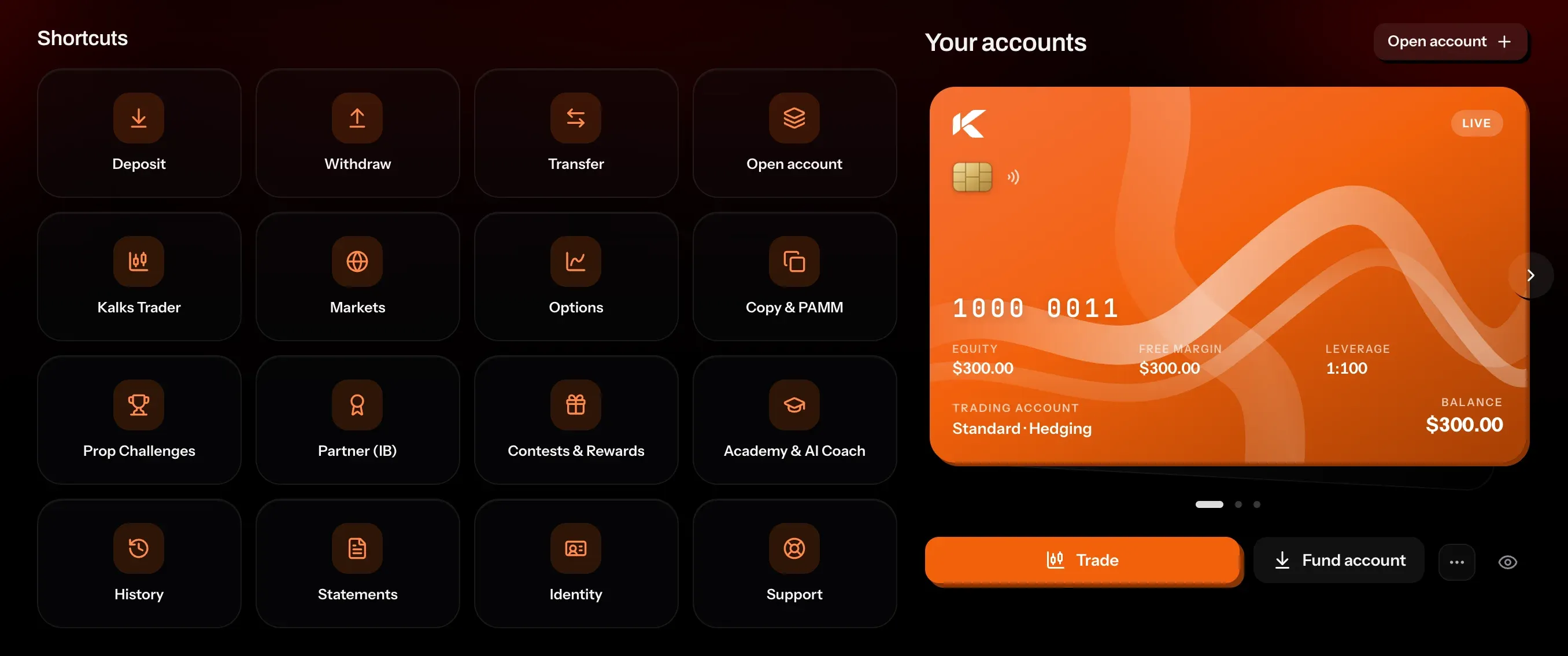
Swipe sideways to see the whole screen.
- 1Shortcuts
Deposit, withdraw, transfer, open an account, Kalks Trader, markets, options, copy trading and more, one tap each.
- 2Open another account
CFD or Options, live or demo, from the same screen.
- 3Live or demo
Every card says which kind of account it is.
- 4Your account as a card
Login number, equity, free margin, leverage, account type and mode, and the balance.
- 5Swipe between accounts
Each live and demo account is a card of its own.
- 6Trade or fund
Trade opens Kalks Trader on the account; Fund account moves money in from your wallet.
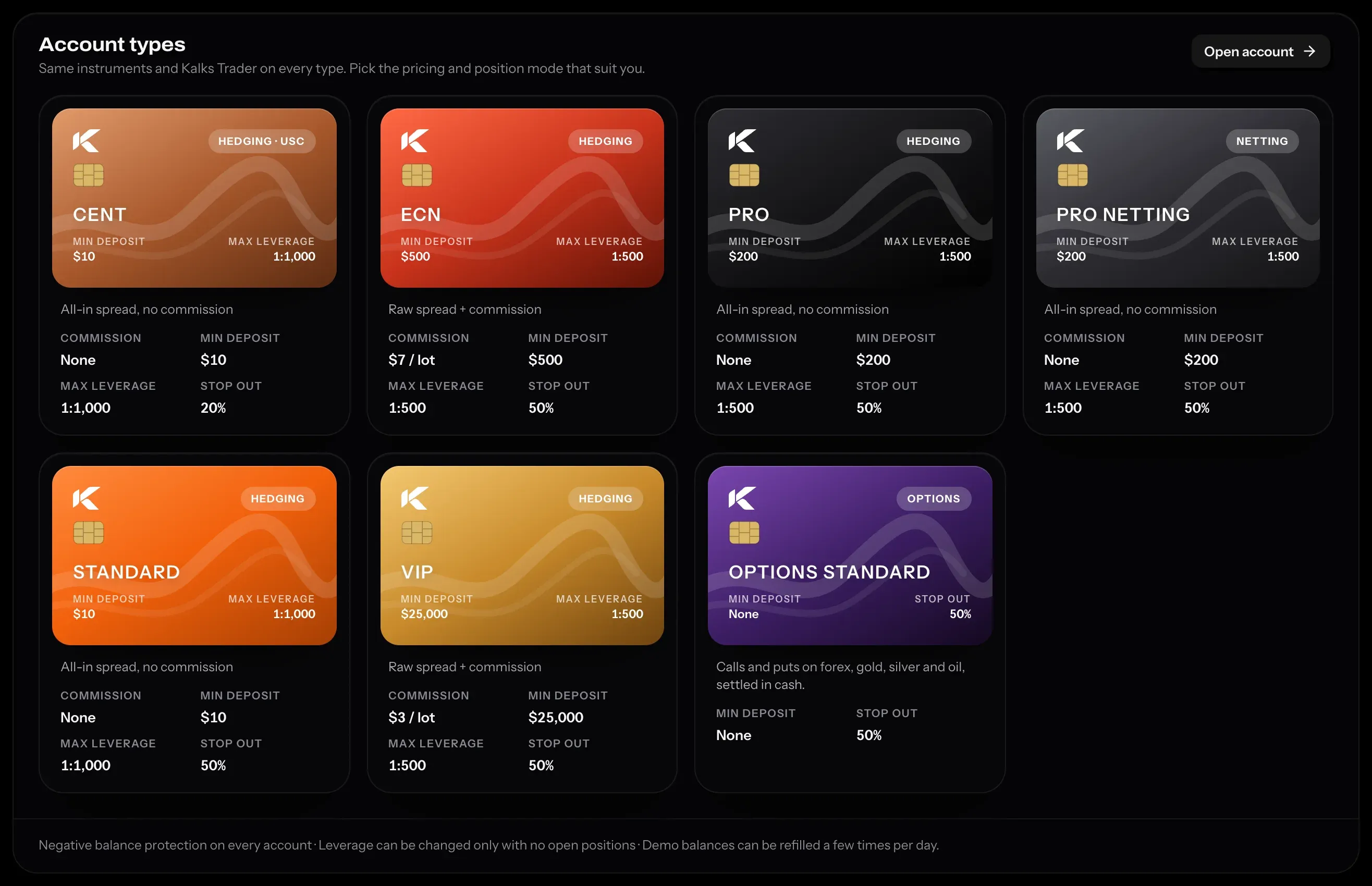
The accounts page of the Client Area shows each type as a card with its minimum deposit, maximum leverage, position mode and pricing. Pro also comes as Pro Netting.
Options get their own account.
An account trades one product. Open an Options account next to your CFD account: one wallet funds both, transfers are instant and free.
Options Standard
Calls and puts on forex, gold, silver and oil. Daily and weekly expiries, settled in cash in US dollars.
- Minimum deposit
- No account minimum
- Commission
- $0.25 per contract, capped at 10% of the premium
- Leverage
- None: you pay the premium in cash
- Selling options
- Allowed; uses margin
- Demo
- Free, with virtual funds
Options Pro
Coming soonLower per-contract fees for larger accounts.
How the split works
- A CFD account trades CFDs. An Options account trades options.
- Hold both at once, live and demo.
- One USDT wallet funds every account.
- Prop, copy, PAMM and MAM accounts trade CFDs only.
Compare every account.
The five CFD accounts first, then the Options accounts. Scroll the table sideways on a phone.
| CFD accounts | Standard | Pro | ECN | Cent | VIP |
|---|---|---|---|---|---|
| Account currency | USD | USD | USD | USC (US cents) | USD |
| Minimum deposit | $10 | $200 | $500 | $10 | $25,000 |
| Leverage | 1:50 · 1:100 · 1:200 · 1:500 · 1:1000 | 1:50 · 1:100 · 1:200 · 1:500 | 1:50 · 1:100 · 1:200 · 1:500 | 1:100 · 1:200 · 1:500 · 1:1000 | 1:50 · 1:100 · 1:200 · 1:500 |
| Pricing | All-in spread, no commission | All-in spread, no commission | Raw spread + commission | All-in spread, no commission | Raw spread + commission |
| Spread | Raw + 1.0 pip | Raw + 0.3 pip | Raw, no markup | Raw + 1.0 pip | Raw, no markup |
| Commission | None | None | $7 per lot round turn | None | $3 per lot round turn |
| Margin call / stop out | 100% / 50% | 100% / 50% | 100% / 50% | 60% / 20% | 100% / 50% |
| Position mode | Hedging | Hedging or Netting | Hedging | Hedging | Hedging |
| Negative balance protection | Yes | Yes | Yes | Yes | Yes |
| Best for | Most traders, from the first trade on | Active traders who want tighter spreads and no commission | Scalpers and high-volume traders | Testing a strategy with real money at a small size | Large accounts and professional volume |
| Options accounts | Options Standard | Options Pro |
|---|---|---|
| Status | Live | Coming soon |
| In short | Calls and puts on forex, gold, silver and oil. | Lower per-contract fees for larger accounts. |
| Minimum deposit | No account minimum | To be announced |
| Commission | $0.25 per contract, capped at 10% of the premium | To be announced |
| Leverage | None: you pay the premium in cash | To be announced |
| Selling options | Allowed; uses margin | To be announced |
Trading in four steps.
- 01
Sign up
Create your Kalks profile in the Client Area with your email. It takes a minute.
- 02
Open an account
CFD or Options, live or demo. Choose the type and leverage; your login is issued at once.
- 03
Fund your wallet
Deposit USDT on BNB Chain (BEP20) and TRON (TRC20). Credited usually within a minute.
- 04
Trade
Move funds to your account, instantly and free, and trade in Kalks Trader.
Deposit USDT. Trade in a minute.
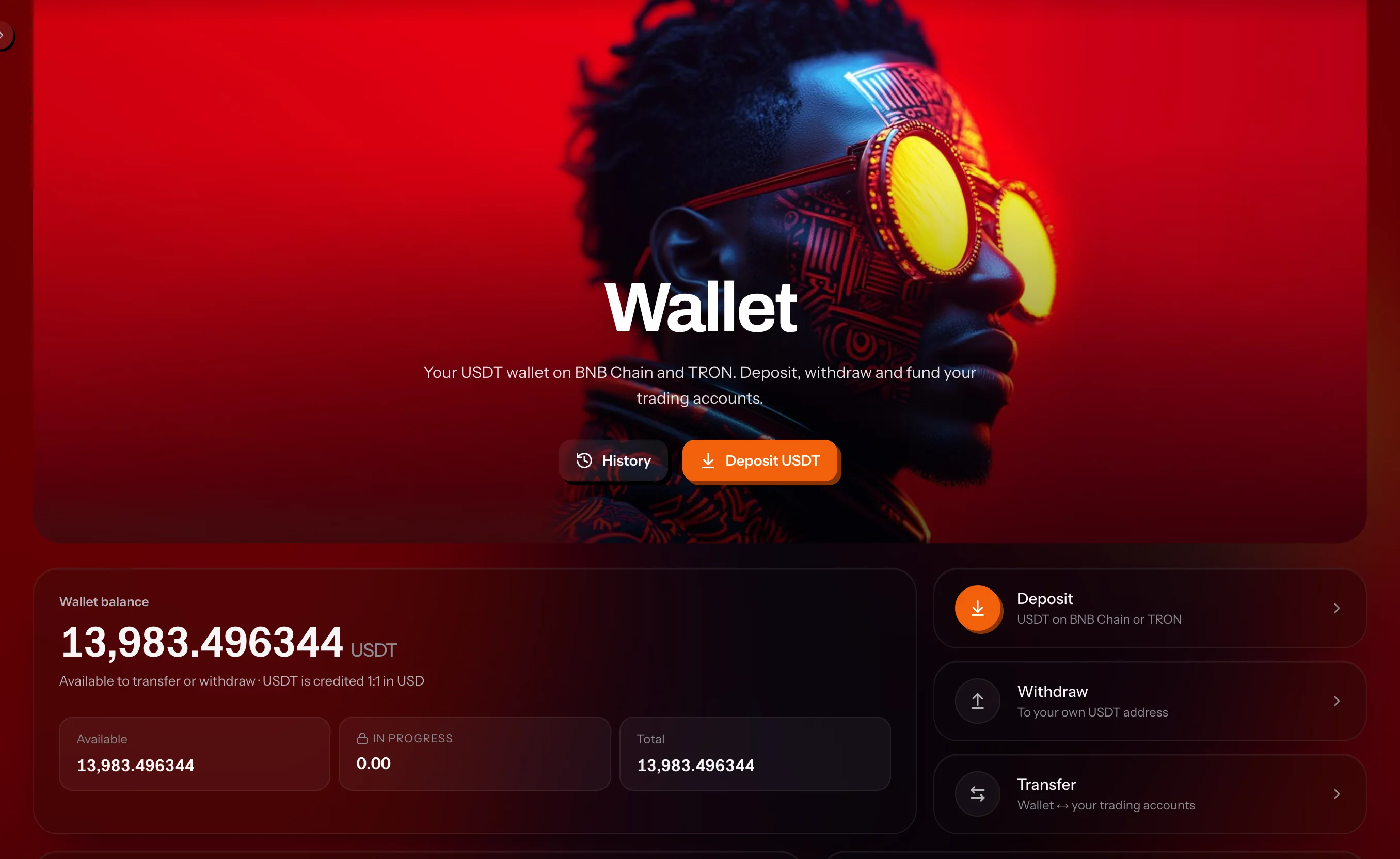
USDT on BNB Chain (BEP20) and TRON (TRC20), verified on-chain. Pay from MetaMask or TronLink, or send to your deposit address. USDT is credited 1:1 as US dollars.
- Minimum deposit
- 10 USDT
- Usual time to credit
- ~1 min
- Wallet to account, instant
- $0
- Flat withdrawal fee
- 1 USDT
Withdrawals from 10 to 50,000 USDT per request need a verified identity and are reviewed before they are sent. To protect your account, funds cannot be withdrawn within 24 hours of a deposit.
Accounts, answered.
Can one account trade CFDs and options?
How many accounts can I open?
What is the difference between hedging and netting?
What is a Cent account?
Can I change my leverage later?
Do I need to verify my identity?
What does “raw spread” mean?
Risk warning: CFDs are complex instruments and come with a high risk of losing money rapidly due to leverage. Consider whether you understand how CFDs work and whether you can afford to take the high risk of losing your money. Buying an option can lose 100% of the premium paid. Selling an option can lose more than the premium received and uses margin. Read the risk warning
Open your account today.
Sign up once, open CFD and Options accounts side by side, and practise on $10,000 of demo money before you go live from $10.