
Every instrument on one screen.
A big, quiet chart with the market list beside it and your positions below, for CFDs and options alike. In your browser and on Android, with nothing to install on a computer.
live markets on one list, plus Kalks FX Options on 12 underlyings
- 4 chart types
- 9 timeframes
- 35 indicators
- 6 drawing tools
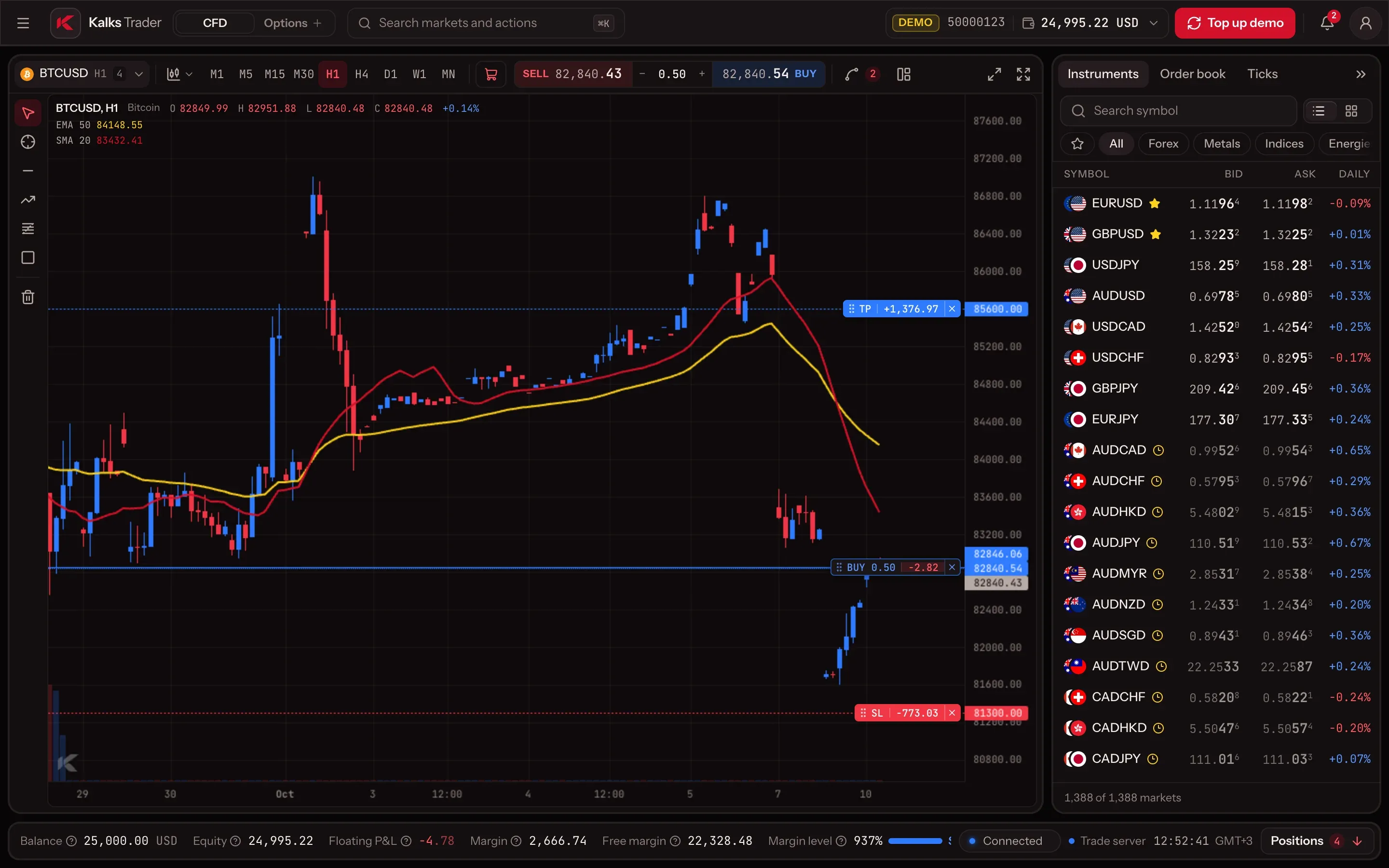
Chart first, part by part.
Point at a number to see what each part does. Up candles are blue, down candles red.
Swipe sideways to see the whole screen.
- 1CFD or Options
Each account trades one product. Switch between your CFD and Options accounts at the top; the workspace follows.
- 2Search markets and actions
Find any market or command from the keyboard, without leaving the chart.
- 3Your account
The account you are trading and its balance. Switch accounts from here.
- 4Charts as tabs
Open several markets, switch timeframes from M1 to MN, and split the screen into 1, 2 or 4 charts.
- 5One-click Sell · lot · Buy
A slim bar in the chart toolbar: set the lot size and trade at the live price, or open the full ticket first.
- 6Drawing tools
Trend lines, horizontal levels, channels, rectangles and the crosshair, on a rail beside the chart.
- 7Position, stop and target lines
Every position, stop loss and take profit is a line on the chart with its live P&L. Drag a line to move the level.
- 8Instruments, order book and ticks
261 live markets with bid, ask and the day's change, favourites, search, and the depth of the market one tab over.
- 9Account at a glance
Balance, equity, floating P&L, margin, free margin and margin level, updated with every tick.
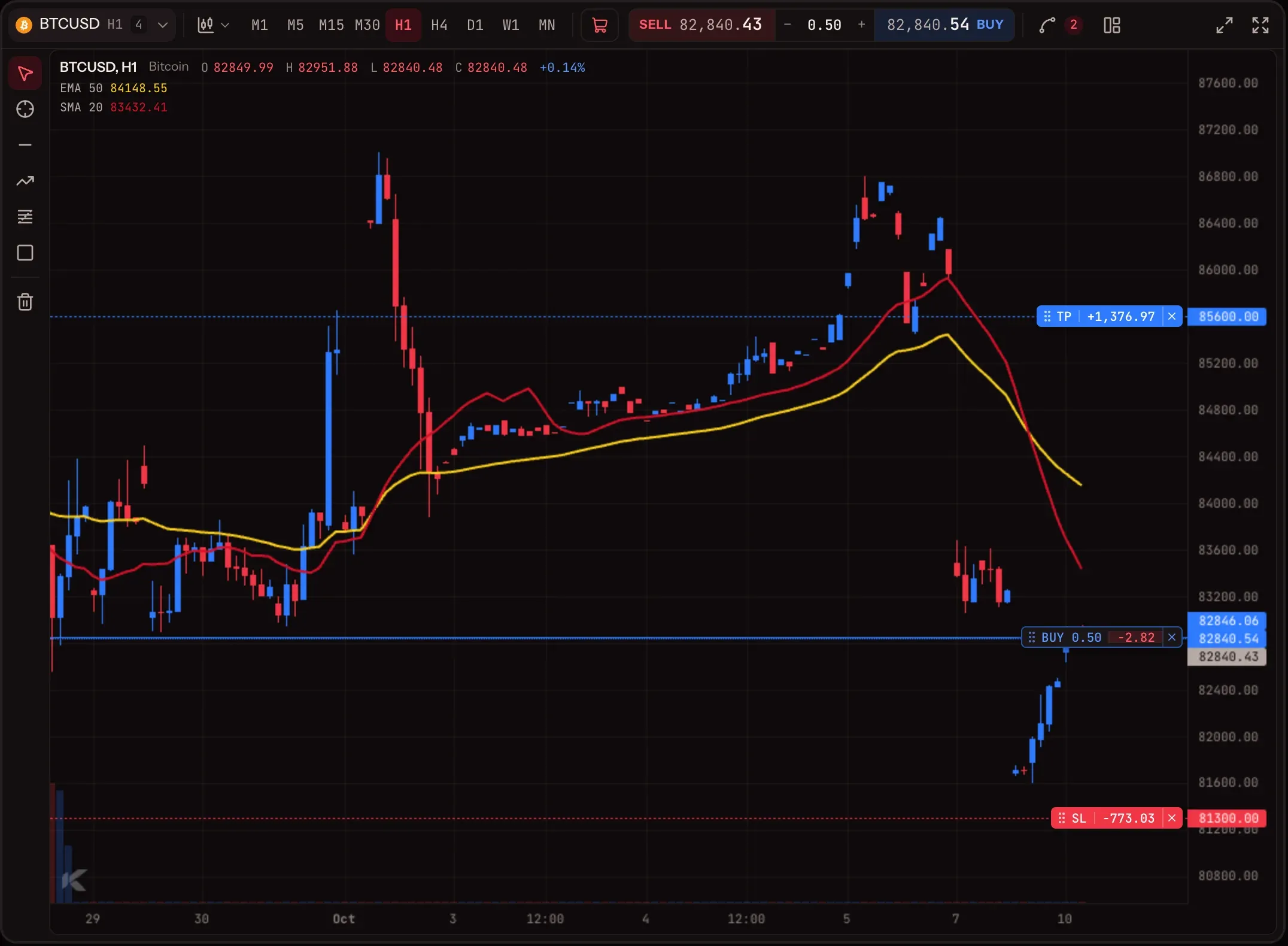
Sell · lot · Buy, one click.
Everything for the chart in one slim row above it, with the trade bar in the middle. It never covers the candles.

Swipe sideways to see the whole screen.
- 1Market and open charts
The market on this chart and how many charts you have open.
- 2Chart type
4 types: candles, bars, line and area.
- 3Timeframes
9 of them, M1 to MN, one click each.
- 4Order ticket
The full ticket for limit, stop and stop-limit orders, with every number shown.
- 5Sell
Sell at the live bid. With one-click trading on it goes straight in; otherwise you confirm.
- 6Lot size
Step the volume with − and +, or type it.
- 7Buy
Buy at the live ask, the same way.
- 8Indicators
35 indicators; the badge counts the ones on this chart.
- 9Layout
1, 2 or 4 charts, ready layouts, and which panels show.
- 10Full chart
Hide everything but the chart when you want to focus.
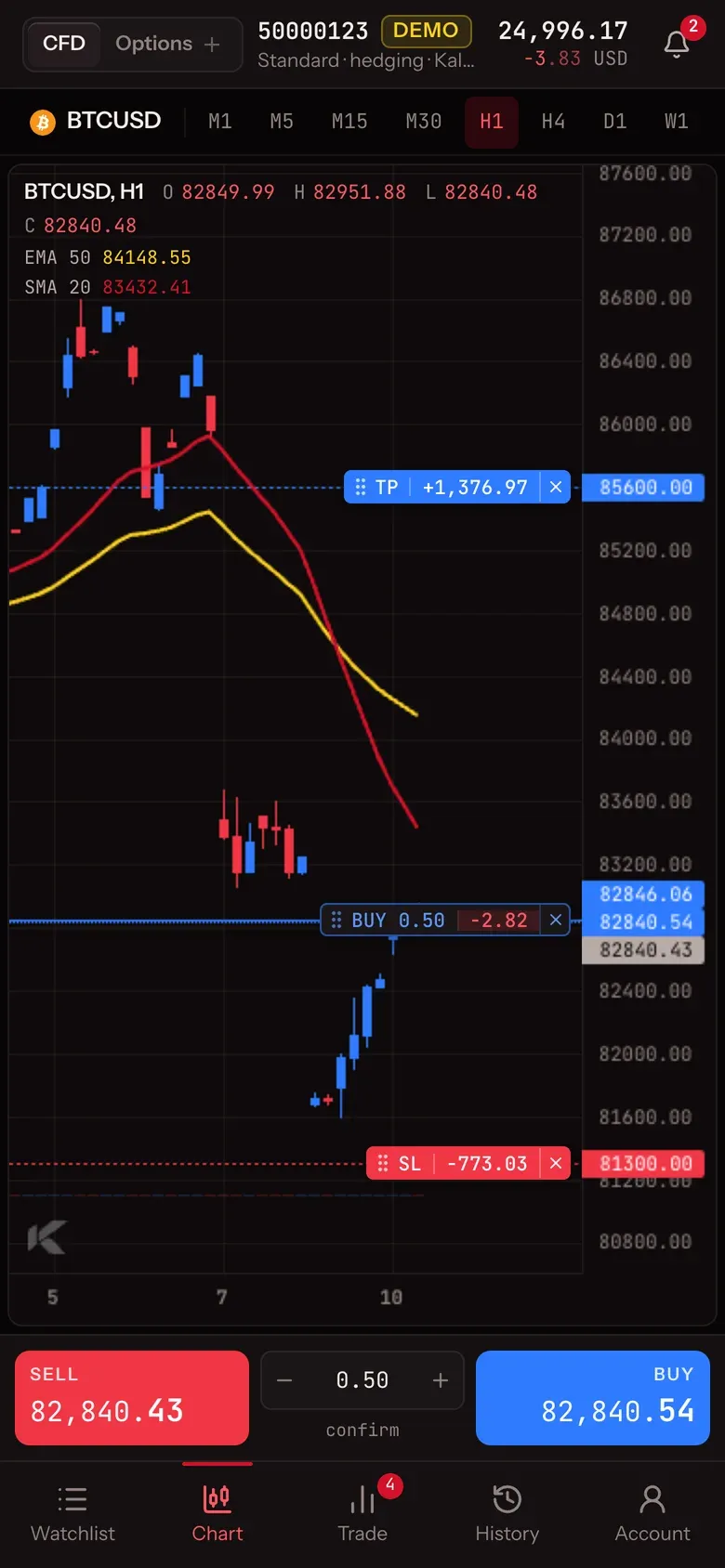
Your levels are lines you can drag.
Stop loss, take profit, pending orders and alerts sit on the chart. Move one along the price axis and the order follows.
Swipe sideways to see the whole screen.
- 1Prices and indicator values
The market and timeframe, open, high, low, close and change, and the value of each indicator on the chart.
- 2Drawing tools
6 tools on a rail beside the chart, and a bin to clear them.
- 3Take profit
The target as a dashed line with the profit it would lock in. Drag it along the price axis to move it.
- 4Your position
Side, volume and live P&L on the line at your entry price.
- 5Stop loss
The stop as a line with the loss, in money, if it is hit. Drag to move it.
- 6Prices on the axis
Your entry, the live ask and the live bid, marked on the price axis.
Set it up your way.
35 indicators one search away, and layouts from a single chart to a scalper's screen with the order book.
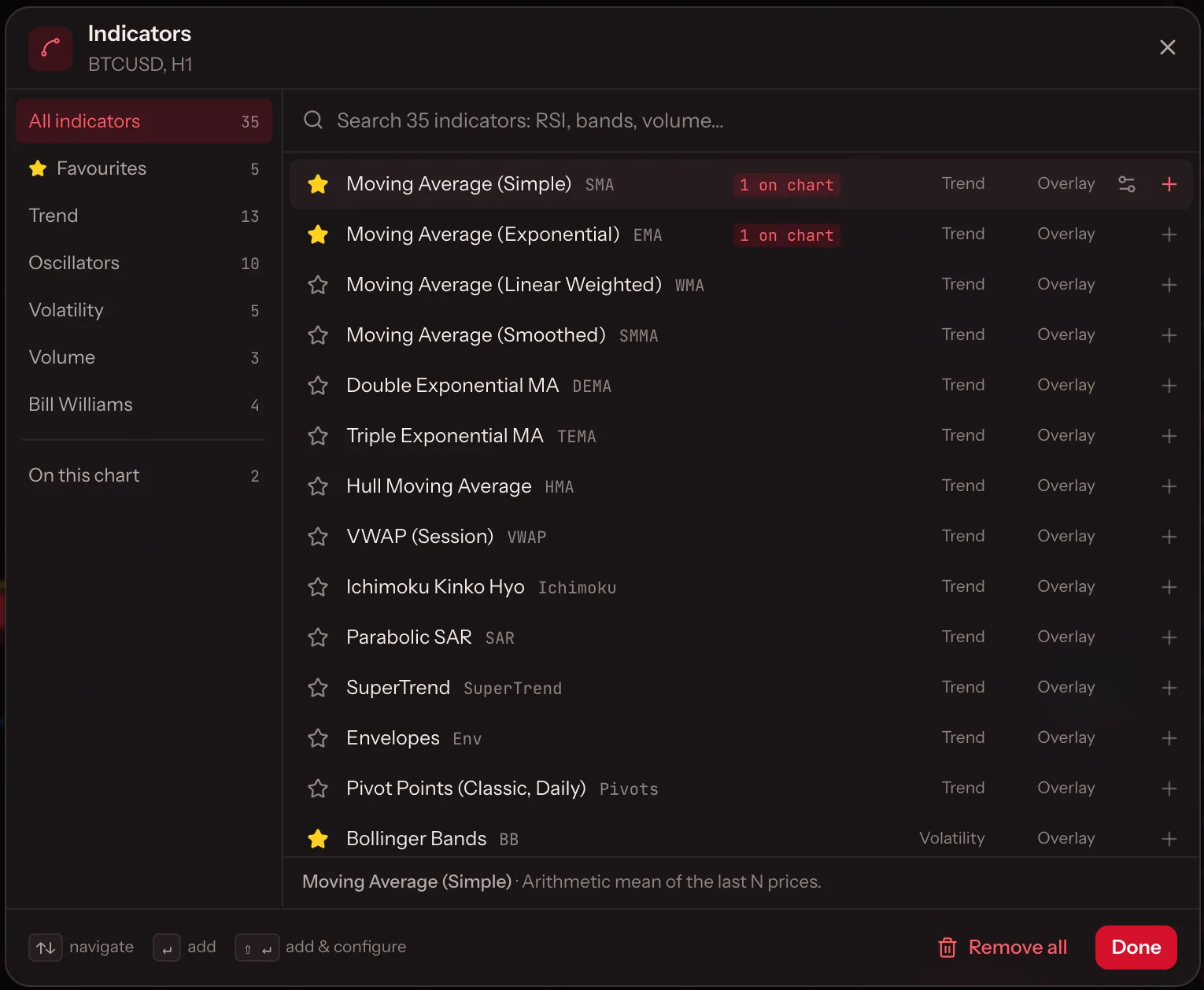
Indicators
Swipe sideways to see the whole screen.
- 1Grouped
Trend, oscillators, volatility, volume and Bill Williams, plus your favourites.
- 2Search
All 35 indicators by name or short code.
- 3Favourites
Star the ones you use and they gather in one list.
- 4On this chart
See at a glance which indicators are already on the chart.
- 5Add and set up
Add one with +, or open its settings first.
Layout
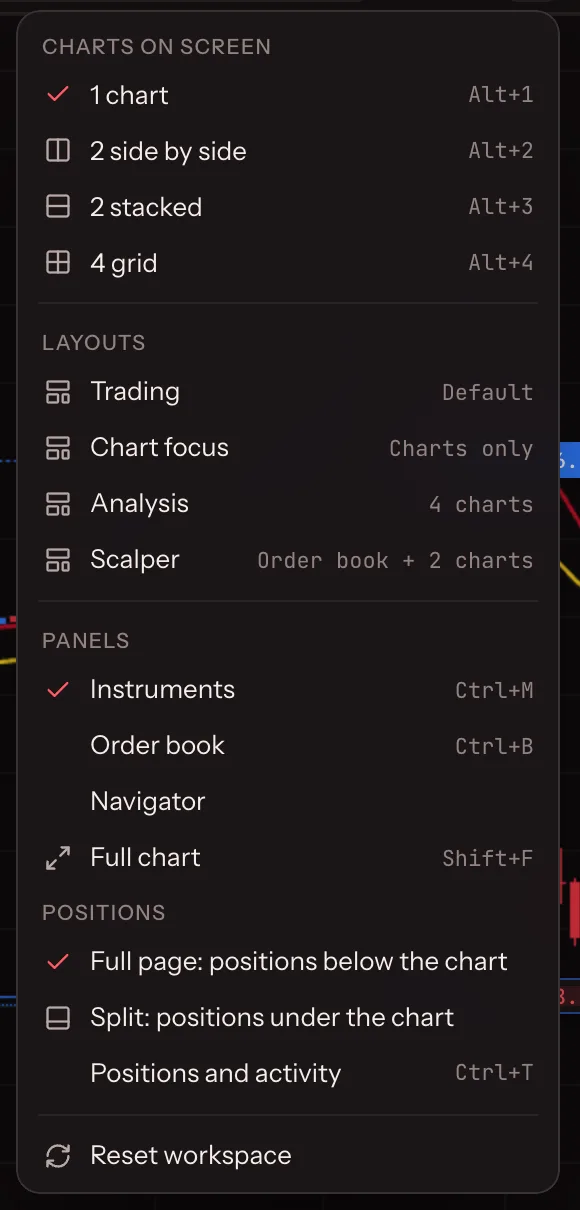
- 1Charts on screen
1 chart, 2 side by side, 2 stacked or a grid of 4.
- 2Ready layouts
Trading, Chart focus, Analysis with 4 charts, and Scalper with the order book and 2 charts.
- 3Panels
Show or hide the instruments, the order book and the navigator, or go full chart.
- 4Positions
On a full page below the chart, or split under it.
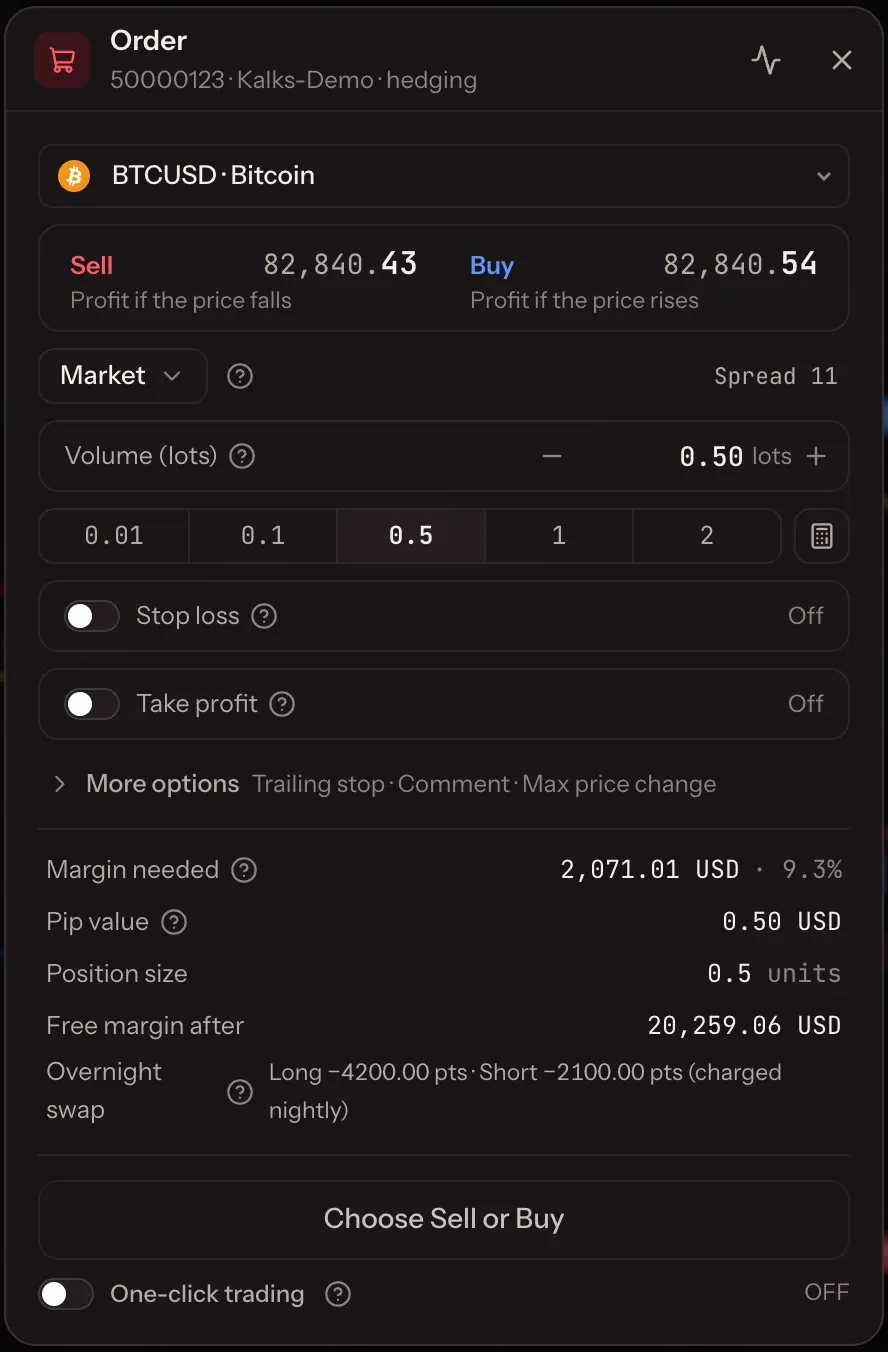
Every number before you click.
Server-side trailing stops, OCO and expiry by date too, for when a market order is not enough.
- 1Sell and Buy, live
Both prices with every tick, and what each side means for you.
- 2Order type
Market, limit, stop and stop-limit.
- 3Volume
Presets from 0.01 lot, or type your own.
- 4Stop loss and take profit
Switch each on and set it by price, pips or money.
- 5More options
Trailing stop, a comment and the maximum price change you accept.
- 6The numbers first
Margin needed, pip value, position size and your free margin after the trade.
- 7Overnight swap
What holding overnight costs for a long and a short, before you trade.
- 8One-click trading
Switch it on to trade straight from the chart without a confirmation.
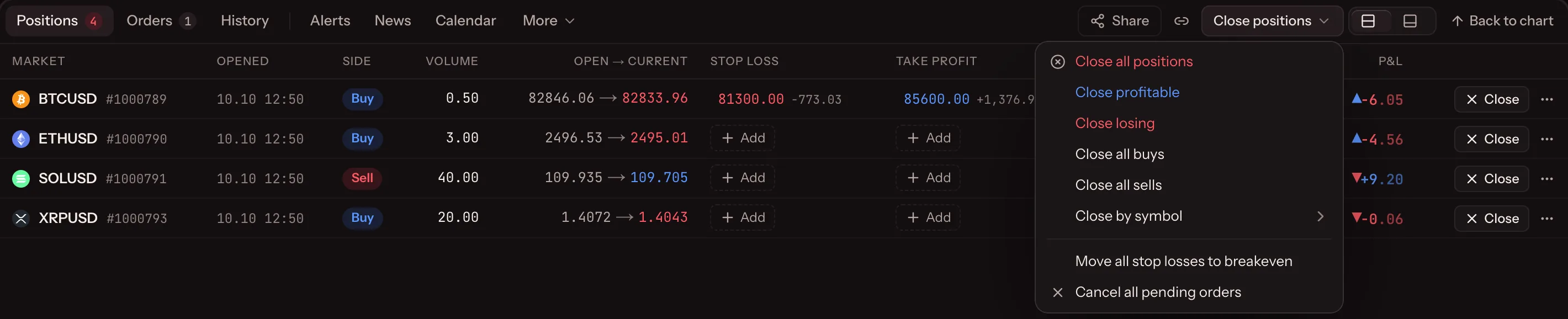
Live P&L, bulk actions.
Open price to current price, stops and targets you add inline, swap and commission, and one menu to close many at once.
Swipe sideways to see the whole screen.
- 1One panel
Positions, orders and history, with alerts, news and the calendar a tab away.
- 2Open to current
The open price and the current price of every position.
- 3Stops inline
Add a stop loss or a take profit right in the row.
- 4Close in one click
Close a position from its row, or open its menu for partial close and close by.
- 5Close positions
Close all, profitable, losing, buys, sells or by symbol, move every stop to breakeven, or cancel pending orders.

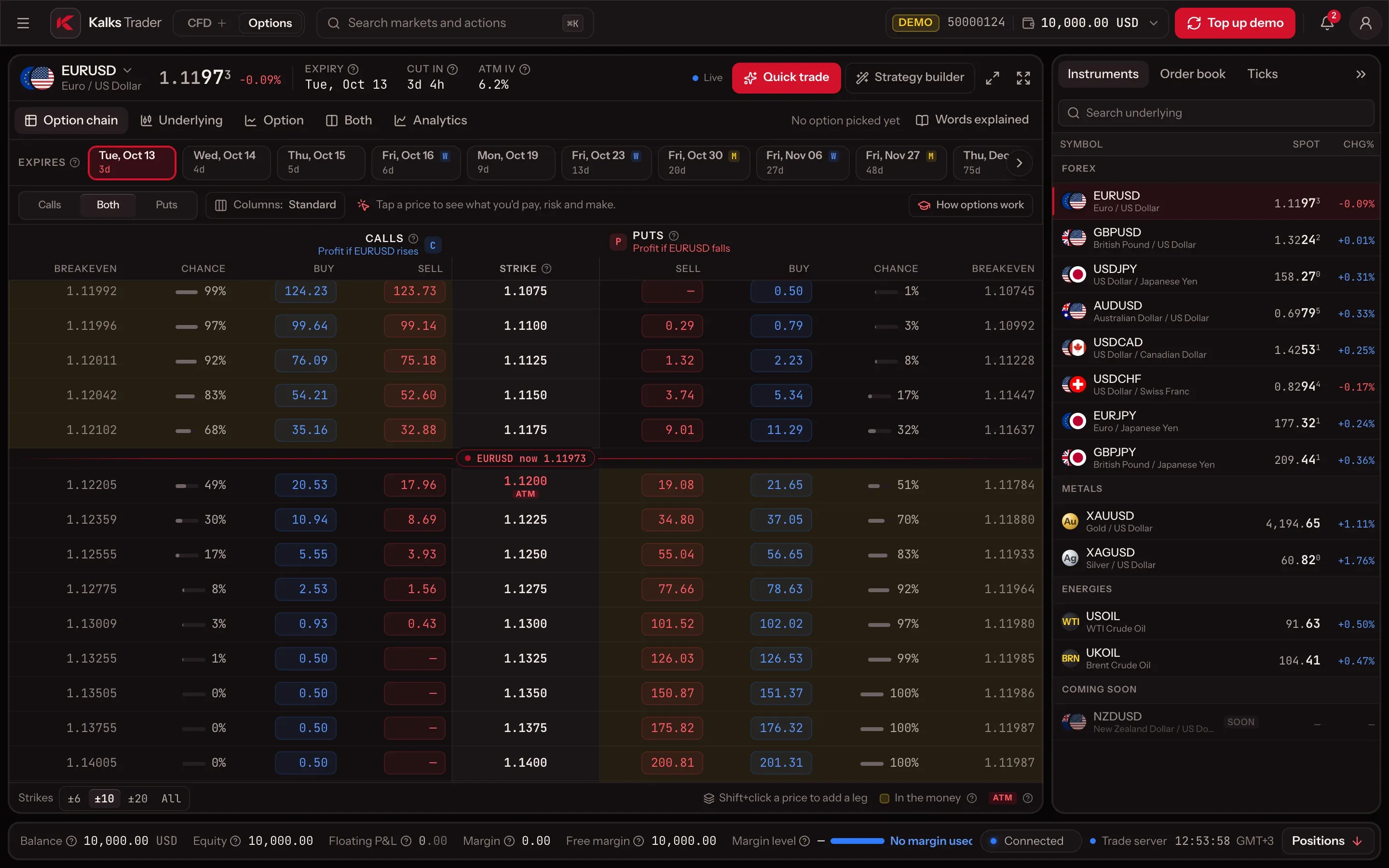
The option chain, built in.
Kalks FX Options in the same terminal: calls and puts by strike, cash-settled in US dollars at 10:00 New York.
Swipe sideways to see the whole screen.
- 1Options mode
The same terminal on your Options account, with the chain in place of the chart.
- 2Expiry, cut and volatility
The expiry on screen, the time left to the 10:00 New York cut, and at-the-money volatility.
- 3Quick trade and strategy builder
One call or put in a tap, or 8 ready-made strategies of up to 8 legs.
- 4Chain, charts and analytics
Switch between the chain, the underlying chart, the option chart, both, and analytics.
- 5Expiries
Daily and weekly: the next 5 business days and the next 4 Fridays.
- 6Calls and puts
Calls profit if the price rises, puts if it falls. Buy and sell prices for every strike.
- 7Chance and breakeven
The chance of finishing in the money and the price you need at expiry, on every row.
- 8Where the price is now
The current price is marked between the strikes; the at-the-money strike is flagged.
- 9Underlyings
12 markets: 8 FX pairs, gold, silver and oil.
The same terminal in your pocket.
Kalks Trader on Android and in any phone browser: the chart with your lines, Sell and Buy at the bottom, watchlist, positions and history one tap away.
- Android app for Kalks Trader and the Client Area
- Translated in full, 22 languages
- Sign in once, switch accounts in a tap
The full list, in short.
- 01Charts4 chart types, 9 timeframes from M1 to MN, 35 indicators and 6 drawing tools.
- 02OrdersMarket, limit, stop and stop-limit. Stop loss, take profit, a server-side trailing stop, OCO and expiry by date.
- 03One-click tradingSell and buy straight from the chart, or switch it off and confirm every trade.
- 04Trade on the chartDrag stop loss, take profit, pending orders and alerts along the price axis.
- 05Depth ladderThe order book beside the chart, with limit orders in one click.
- 06Position toolsPartial close, close by, and bulk close: all, winners, losers, buys or sells.
- 07Full chart modeHide everything but the chart when you want to focus.
- 08OptionsOption chains, quick trade and the strategy builder for your Options account.
Kalks Trader, answered.
Do I need to install anything?
Is there a mobile app?
Which languages are available?
Open it in your browser.
Sign in with your Kalks account, or look around with live prices first. A demo account starts with $10,000 of virtual money.